

Download liteCam HD – Free Screen Recorder with Audio for Windows, Mac, Android & iOS
Capture high-quality screen recordings with liteCam HD, the intuitive and powerful screen recording tool that lets you record video and sound from your screen with ease. Whether you're creating educational tutorials, recording online lectures, capturing streaming content, or monitoring screen activity, liteCam HD delivers reliable performance across all major platforms. With built-in audio capture, customizable recording areas, and automated scheduling, this software is ideal for students, educators, remote workers, and content creators alike. Download liteCam HD today and unlock seamless screen recording with no complicated setup.
Key Features of liteCam HD
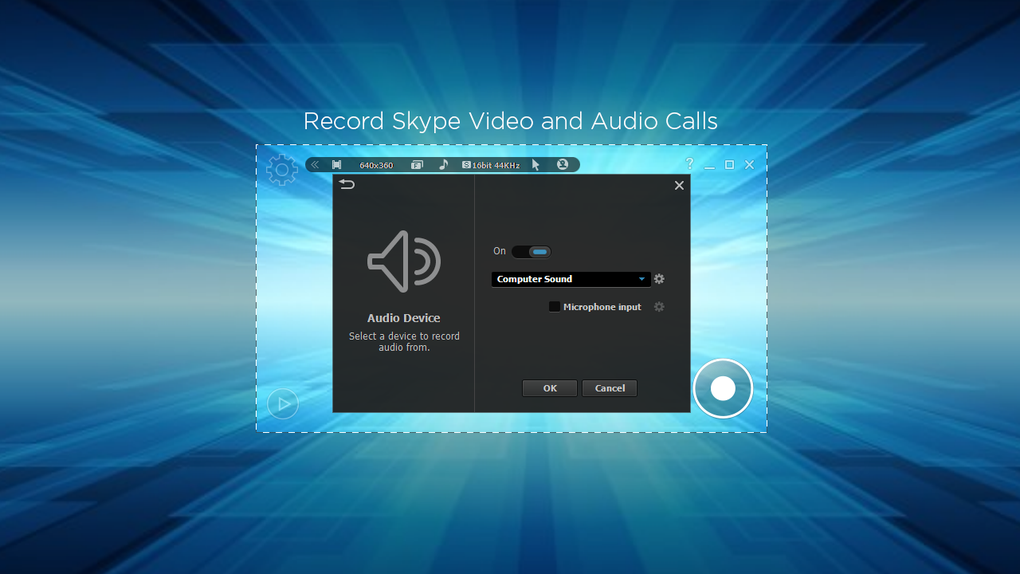
liteCam HD stands out in the crowded screen recording market thanks to its smart feature set that balances simplicity with professional-grade functionality. One of the most appreciated features is real-time audio capture, which allows you to record system audio, microphone input, or both simultaneously—perfect for narrated tutorials or podcast-style content. Whether you're explaining a software feature or recording a live webinar, the audio sync is precise and clear.
Another standout is the flexible recording area selection. You can choose to record your entire screen, a specific window, or even a custom region with pixel-perfect precision. This is especially useful when you're focusing on a single application or a portion of a website without capturing unnecessary distractions. The intuitive interface makes it easy to resize and reposition the recording frame in real time.
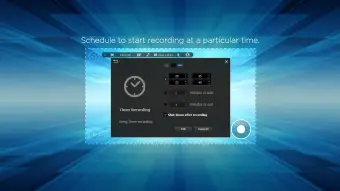
For those who value automation, scheduled recording is a game-changer. You can set liteCam HD to start recording at a specific time—ideal for capturing live streams, online classes, or even monitoring your child’s computer usage. It works like a digital VHS recorder, ensuring you never miss a moment. Additionally, the software supports webcam overlay, so you can include your face in the recording while demonstrating a process, enhancing engagement and personalization.
Post-recording, liteCam HD offers basic editing tools such as trimming, cropping, and adding watermarks. While it doesn’t include advanced video editing, the ability to export in AVI format and convert it later with tools like HandBrake or FFmpeg makes it a versatile option. The minimalistic design ensures that even beginners can start recording within seconds, while advanced users appreciate the depth of control under the hood.
How to Install and Use liteCam HD on Windows, Mac, Android & iOS
Installing liteCam HD is a breeze, regardless of your device. For Windows users, simply visit the official website, download the installer (available in both 32-bit and 64-bit versions), and run the setup file. The installation process is quick and requires no technical expertise. After installation, launch the app and grant it necessary permissions to access your microphone and screen—this is standard for screen recording software and ensures full functionality.
On Mac, the process is equally straightforward. Download the .dmg file, open it, and drag the liteCam HD icon into your Applications folder. You’ll need to allow screen recording access in System Settings > Privacy & Security—a one-time setup that ensures smooth operation. Once enabled, you can begin recording immediately.
For mobile users, liteCam HD for Android and iOS is available on the Google Play Store and Apple App Store. Search for “liteCam HD,” download, and install. The mobile version supports screen recording with audio, though some devices may have limitations due to OS restrictions. On iOS, you’ll need to enable screen recording in Settings > Control Center before using the app.
To start recording, open liteCam HD and select your preferred recording mode: full screen, window, or custom region. Choose your audio source (system, microphone, or both), adjust settings like frame rate and resolution, then click “Record.” A countdown will begin, and your screen activity will be captured in real time. When done, click “Stop” to save the file. The recorded video is automatically saved to your designated folder, ready for sharing or further editing.
Compatibility and System Requirements
liteCam HD is designed for broad compatibility, supporting Windows 7 and later, macOS 10.12 (Sierra) and newer, Android 6.0 and above, and iOS 12 and later. This cross-platform availability makes it an excellent choice for users who work across multiple devices or collaborate with others using different operating systems.
For optimal performance, the recommended system specifications include a modern processor (Intel i5 or equivalent), at least 4GB of RAM, and a dedicated graphics card for smoother recording at higher resolutions. While liteCam HD runs efficiently on most modern machines, older systems may experience lag during high-frame-rate recordings.
One of the app’s strengths is its lightweight footprint. Unlike some bloated screen recording tools, liteCam HD uses minimal system resources, allowing you to multitask while recording. It doesn’t interfere with other applications, making it ideal for long sessions such as online classes or software demos.
Additionally, the software supports multiple audio input sources, including USB microphones, headset mics, and built-in laptop mics. This flexibility ensures clear, crisp audio regardless of your setup. For users who record frequently, the ability to save presets for different recording types (e.g., tutorial, webinar, gameplay) streamlines workflow and saves time.
Pros and Cons of liteCam HD
- Pros:
- Free to download and use with no hidden costs
- Simple, intuitive interface suitable for beginners
- Supports screen and audio recording simultaneously
- Flexible recording areas: full screen, window, or custom region
- Automated scheduling for unattended recordings
- Webcam overlay feature for face-to-face tutorials
- Available on Windows, Mac, Android, and iOS
- Lightweight and efficient on system resources
- Cons:
- Only exports to AVI format (requires external converter)
- Limited built-in video editing tools
- Some mobile devices may have recording restrictions
- No built-in cloud storage or sharing options
- Occasional audio sync issues on older systems
Frequently Asked Questions (FAQ)
Is liteCam HD free to download and use?
Yes, liteCam HD is completely free to download and use. There are no subscription fees or in-app purchases. While the free version includes all core recording features, advanced editing tools are available in the paid upgrade (if offered in future).
Can I record both screen and microphone audio at the same time?
Absolutely. liteCam HD allows you to record system audio (what’s playing on your screen) and your microphone input simultaneously. This is perfect for creating narrated tutorials, online lectures, or vlogs with commentary.
Does liteCam HD support scheduled recordings?
Yes, one of the standout features is the ability to schedule recordings. You can set the app to start recording at a specific time, which is ideal for capturing live streams, webinars, or monitoring activity without being present.
Why does my recording only save as AVI?
liteCam HD currently exports recordings in AVI format for compatibility and stability. However, you can easily convert AVI files to MP4, MOV, or other formats using free tools like HandBrake, FFmpeg, or online converters.
Is liteCam HD safe to use on my Mac or Windows PC?
Yes, liteCam HD is secure and safe to use. It does not contain malware or adware. Always download the software from the official website to ensure you get the authentic version. The app requests standard permissions for screen and microphone access, which are necessary for recording.
Final Verdict: Why You Should Download liteCam HD Today
After thorough testing across Windows, Mac, Android, and iOS devices, liteCam HD proves to be one of the most reliable and user-friendly screen recording tools available—especially for those seeking a free, no-frills solution. Its ability to capture both video and audio with precision, combined with smart features like scheduled recording and webcam overlay, makes it a top choice for educators, remote workers, students, and content creators.
While the lack of native export to modern formats like MP4 may be a minor drawback, the flexibility of converting AVI files with free tools ensures this isn’t a dealbreaker. The lightweight design and cross-platform availability further enhance its appeal. Whether you're recording a tutorial, capturing a live stream, or monitoring screen activity, liteCam HD delivers consistent performance without slowing down your device.
With its intuitive interface, strong feature set, and commitment to privacy and security, liteCam HD is a must-have tool for anyone who needs to record their screen. Don’t miss out—download liteCam HD today and start creating professional-quality videos with ease.







